Document Formats
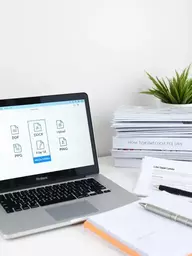
DOCX, PDF, TXT
For editable reports, finalized proposals, and plain text.
When sharing files online, selecting the right type is not just a matter of convenience; it's essential for ensuring compatibility and security. Understanding the nuances of file formats can significantly enhance your collaborative efforts. So, what do you need to know to make your file-sharing experience seamless and effective?
AceFileDrop supports a diverse range of file formats across several categories, ensuring seamless collaboration and secure sharing for all your project needs. Below is a breakdown of the common file types we accommodate, which is vital for best practices for secure file sharing:
DOCX, PDF, TXT
For editable reports, finalized proposals, and plain text.
XLSX, CSV, TSV
For data analysis and large datasets.
PPTX
For slideshows and collaborative presentations.
WAV, MP3, WebM
For multimedia projects and clips.
JPEG, PNG, GIF
For graphics, marketing visuals, and photos.
ZIP, RAR
For bundling multiple files into one package.
When it comes to securely sharing files online, knowing the supported file types is crucial. At AceFileDrop, we provide a streamlined platform that allows you to upload various file formats with ease. Whether you’re sharing project documents or multimedia files, understanding the right format can enhance your collaboration efforts and eliminate unnecessary hurdles. Let’s dive into the different file formats we support!
Our platform is designed to accommodate a wide range of file types. This ensures that you can share your content without worrying about format compatibility. Here’s a breakdown of the common file formats we accept:
With such a diverse selection of supported file types, you can confidently upload your project materials to AceFileDrop. This flexibility allows for seamless collaboration, whether you’re working with manuscripts, spreadsheets, or multimedia content, helping you to share large files securely online.
For text-based files, we support popular formats like DOCX, PDF, and TXT. These formats are essential for sharing reports, proposals, and other written materials. DOCX files are great for editable documents, while PDFs ensure that your formatting remains intact.
When it comes to data management, our platform accommodates XLSX, CSV, and TSV formats. These formats are invaluable for sharing large datasets, ensuring that your team can easily access and analyze information without any issues.
Need to share a presentation? Our support for PPTX files makes it easy to upload slideshows for collaboration. You won’t have to worry about compatibility problems, allowing your team to focus on refining your presentation.
For those who need to share audio or video files, we support WAV, MP3, and WebM formats. This is especially useful for creators working on multimedia projects. Uploading your audio tracks and video clips is a breeze!
Our platform also supports various image types, including JPEG, PNG, and GIF. Whether you’re sharing visuals for a marketing campaign or collaborating on a graphic design project, you can count on AceFileDrop for secure image sharing.
Lastly, if you have multiple files to share, consider using ZIP or RAR formats for compression. This helps you bundle several files into one convenient package, making it easier and faster to upload.
Choosing the right file type can significantly impact your project’s efficiency. It’s essential to consider what you’re sharing and how your team will use it. Here are some insights to help you decide:
By understanding these factors, you can select the ideal file type for your needs, ensuring a smoother workflow and effective collaboration.
When sharing large files, consider compressing them into ZIP or RAR formats. Not only does this make the upload process faster, but it also helps in keeping your project organized by bundling related files together!
AceFileDrop supports a wide range of file types, including document formats (DOCX, PDF, TXT), spreadsheet formats (XLSX, CSV, TSV), presentation formats (PPTX), audio/video formats (WAV, MP3, WebM), image types (JPEG, PNG, GIF), and compression formats (ZIP, RAR).
Choosing the right file type ensures compatibility, maintains formatting, and enhances collaboration efficiency. For example, DOCX is ideal for editable documents, while PDF is best for finalized reports.
Yes, each file type has its own maximum upload size. It is crucial to check these limits before uploading to prevent failures and ensure a smooth workflow.
AceFileDrop employs secure sharing features. Additionally, users can implement best practices such as choosing the right format and staying within size limits to protect their files during transfer.
Using ZIP or RAR formats helps in bundling multiple files into a single package, making the upload process faster and improving organization for your projects.
As we wrap up our discussion on file upload practices, it’s essential to highlight the key takeaways regarding supported file types and size limits. Understanding these aspects can greatly enhance your workflow and ensure a smooth experience when using AceFileDrop for your project collaborations.
Before uploading any files, consider the following critical points:
Knowing the constraints of your files can save time and reduce frustration. At AceFileDrop, we want you to focus on your projects without worrying about technical issues. This understanding is key to maintaining a collaborative environment, making it easier to fix common file upload issues.
Before hitting that upload button, it's vital to know the limits regarding file types and sizes. This knowledge helps you avoid unnecessary hiccups during your sharing process. Not only does it streamline your workflow, but it also enhances the overall security of your data transfer.
When utilizing AceFileDrop, being aware of these constraints empowers you to make informed decisions on what formats to choose and how to manage your files effectively.
As we encourage safe and effective file uploads, it's time to consider the next steps that both users and developers can take to enhance their file-sharing experiences.
By taking these proactive steps, you'll not only improve your file-sharing experience but also contribute to a safer digital environment. At AceFileDrop, we are committed to ensuring you have the best tools and knowledge at your fingertips. Together, we can foster a collaborative space where sharing files is seamless and secure!
Here is a quick recap of the important points discussed in the article:
Jordan V. Mitchell is a digital solutions expert, enhancing project collaboration through technology. With extensive experience in secure file management, Jordan streamlines workflows and boosts productivity, ensuring clients can focus on their projects without technical hurdles. At AceFileDrop, Jordan helps you share large files—like manuscripts, videos, and project materials—securely and effortlessly. Ready to simplify your file sharing?
At AceFileDrop, we offer secure private file sharing and temporary storage tailored for qualified clients. Streamline your project collaboration and share large files with ease and peace of mind.
Secure Your Project Files Today!